March 3rd, 2026
March 2026 Update - A lot of new things! 🤯
Hey everyone!
We've been heads down building, and this is one of our biggest updates yet. From a fully responsive Mobile Editor to RTL support, pages with different sizes, a brand-new Anchor System, and much more — there's a lot to unpack. Let's dive in.
Mobile Editor
The editor now works on mobile devices. The entire layout adapts to smaller screens — the sidebar transforms into a bottom tab bar, template selection becomes a full-screen modal, and all controls are touch-friendly with adjusted zoom and pan behavior.
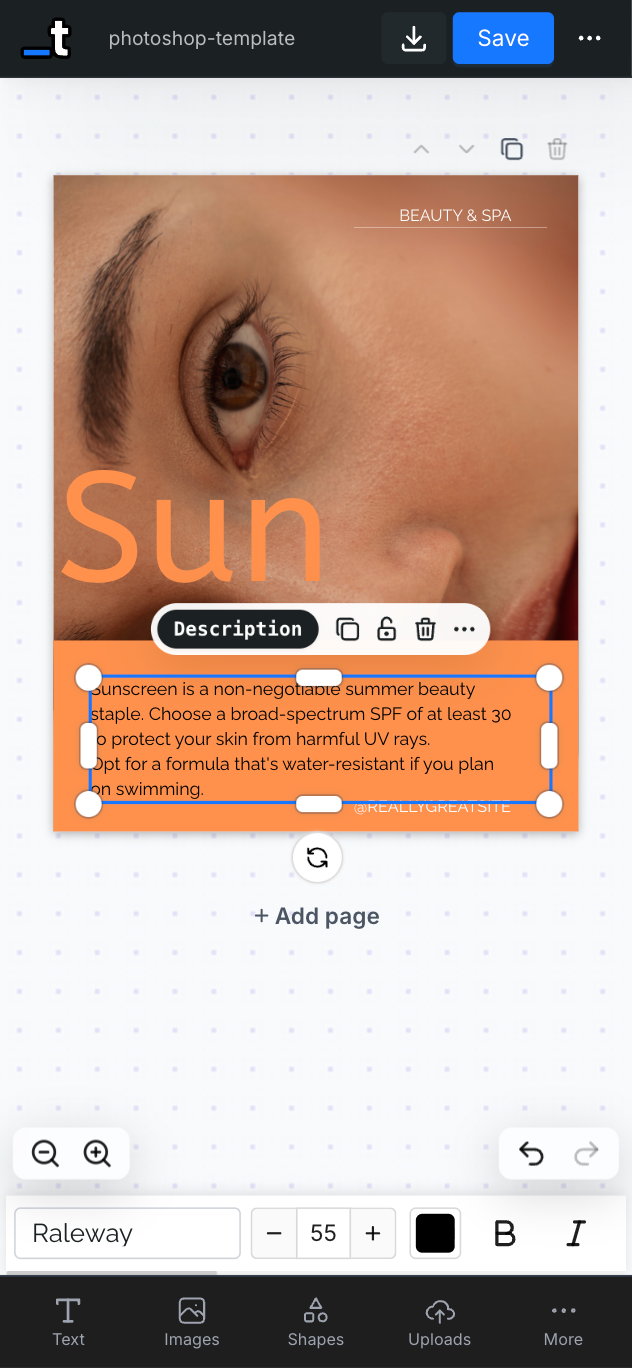
Whether you're making a quick edit on the go or reviewing a template from your phone, the experience is smooth and intuitive.
Pages with Different Sizes
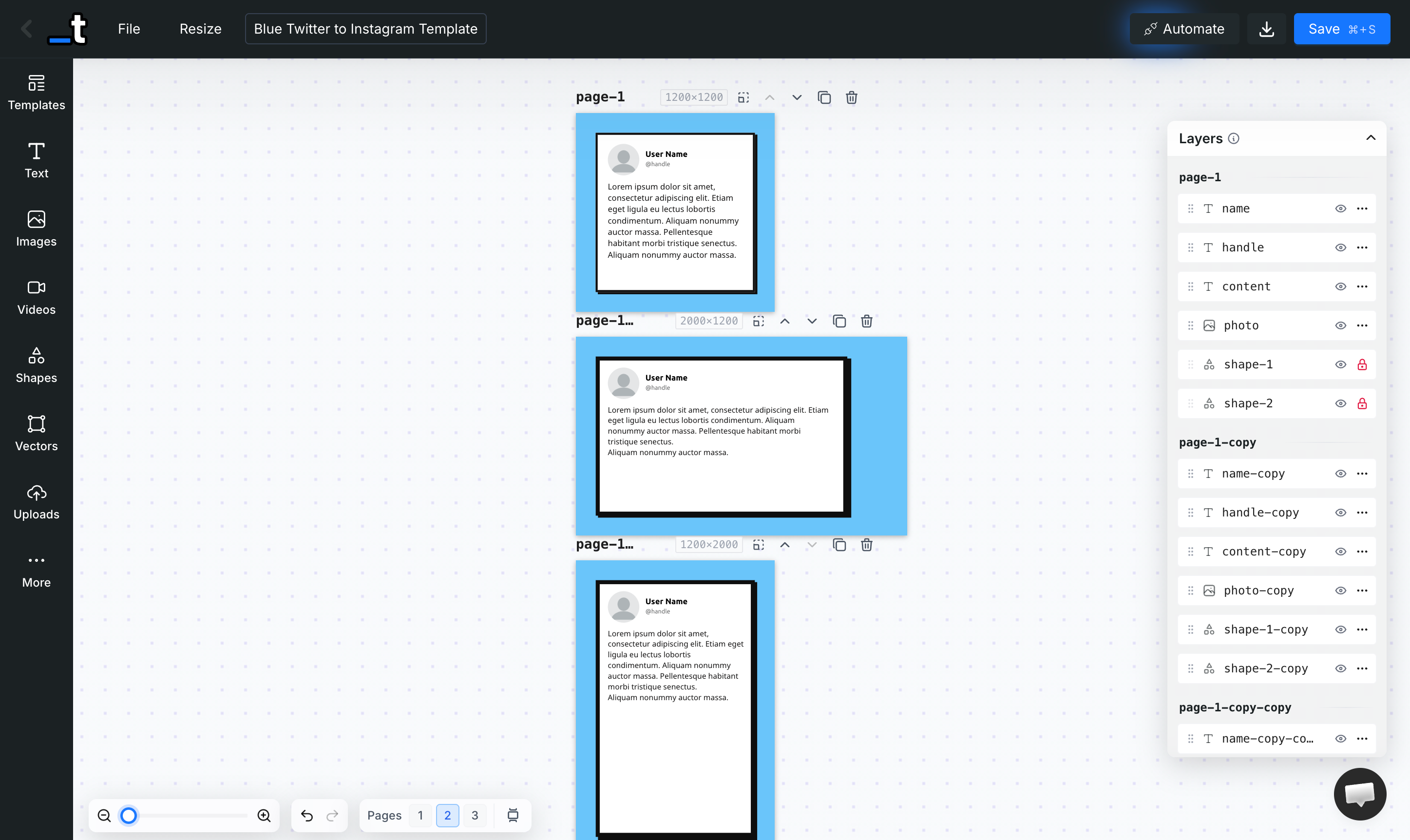
Multi-page templates are no longer limited to a single size. Each page can now have its own width and height, independently. The page header shows each page's dimensions, and you can resize any page without affecting the others — perfect for creating documents with mixed layouts, like a social media kit with posts, stories, and banners in a single template.
RTL Support
Full Right-to-Left text support is here. You can set any text layer to RTL, LTR, or Auto mode. In Auto mode, the editor detects Arabic, Hebrew, Persian, Urdu, and other RTL scripts as you type and automatically adjusts the text direction and alignment in real time.
Anchor System (Beta)
Layers can now be anchored to other layers. When the target layer changes size at render time — for example, a text layer that grows due to dynamic content from the API — the anchored layer automatically repositions itself relative to it.
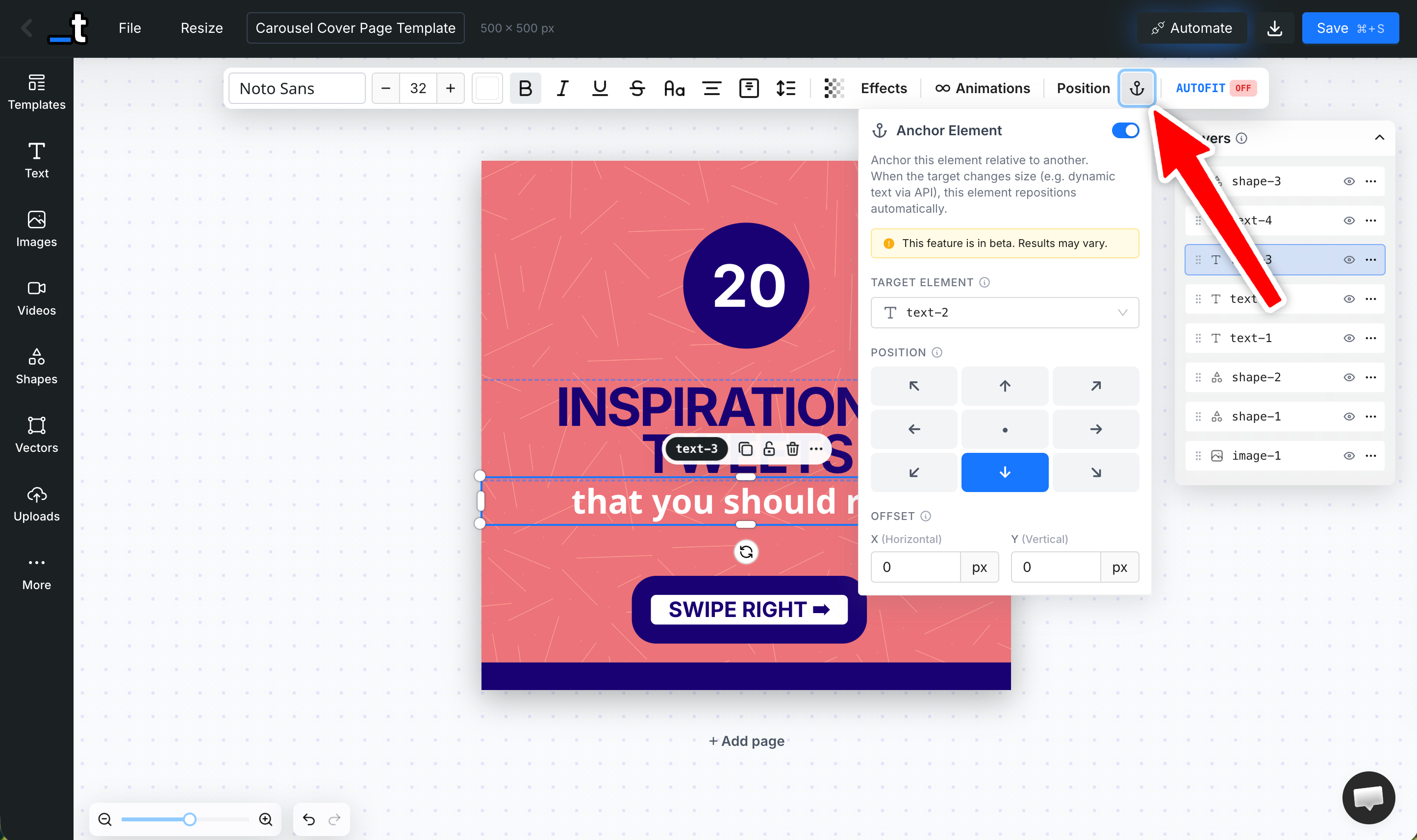
This is a game-changer for dynamic templates where content length varies. Choose from 9 anchor positions (top-left, bottom-center, right-center, etc.) and fine-tune with X/Y offsets. Anchored layers even support chaining — an anchored element can be the target for yet another anchor.
9 anchor positions available
X/Y offset controls for fine-tuning
Cascading anchor chains supported
Target layers automatically get
height: autoso they can grow with content
Soft Edges
Images can now have soft, feathered edges that fade smoothly into the background. Enable it from the Image Effects panel and control the edge size, corner roundness, and background fill color.
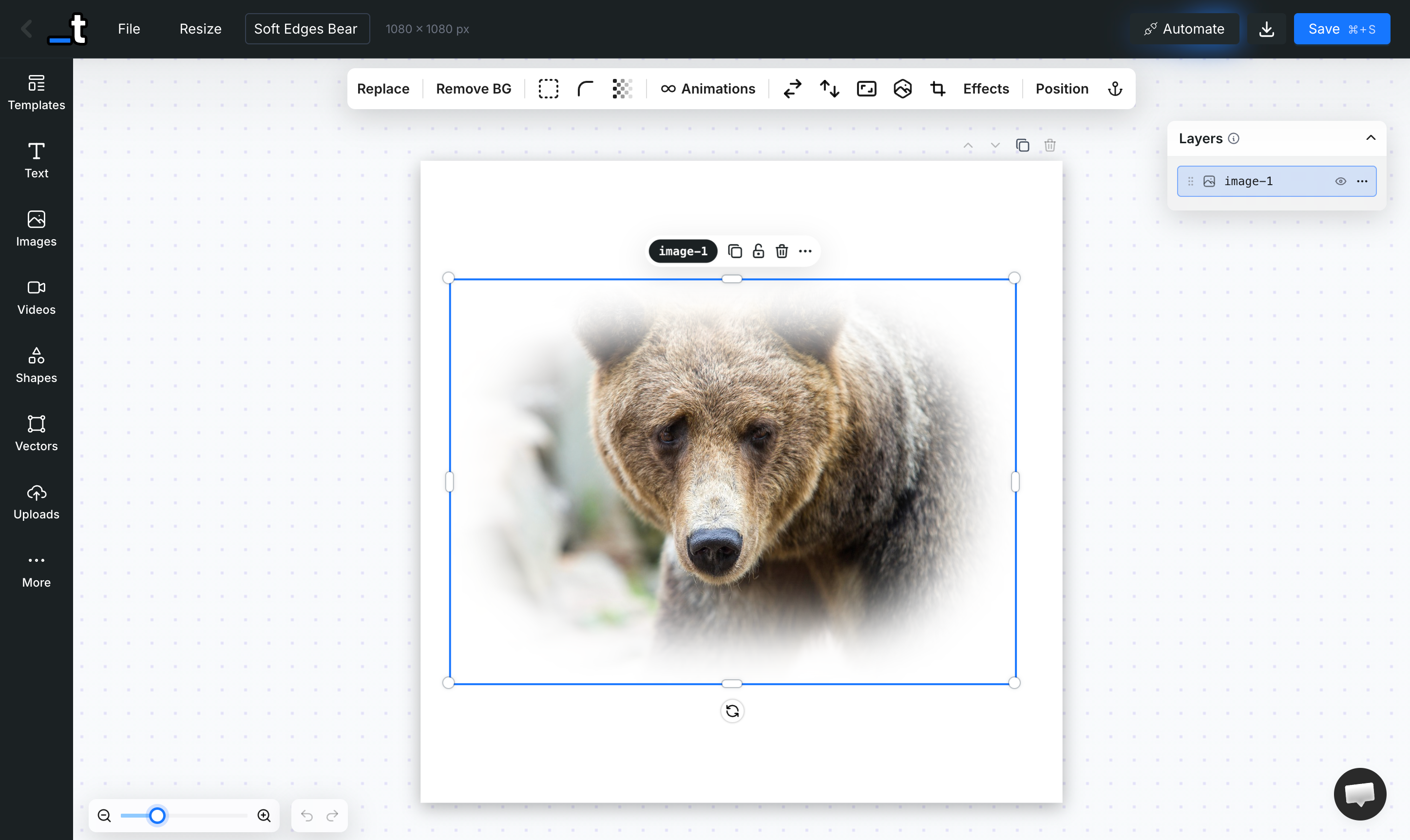
Under the hood, this uses a Gaussian-blurred canvas mask — so it looks great at any resolution and renders perfectly via the API.
Custom SVG Mask
Beyond the built-in shape masks (circle, hexagon, star, etc.), you can now upload any custom SVG file to use as a clipping mask on an image layer. The SVG is automatically cleaned up — metadata stripped, fills normalized — and applied as a mask. This opens up endless creative possibilities for custom-shaped image frames.
Inline Text Styling
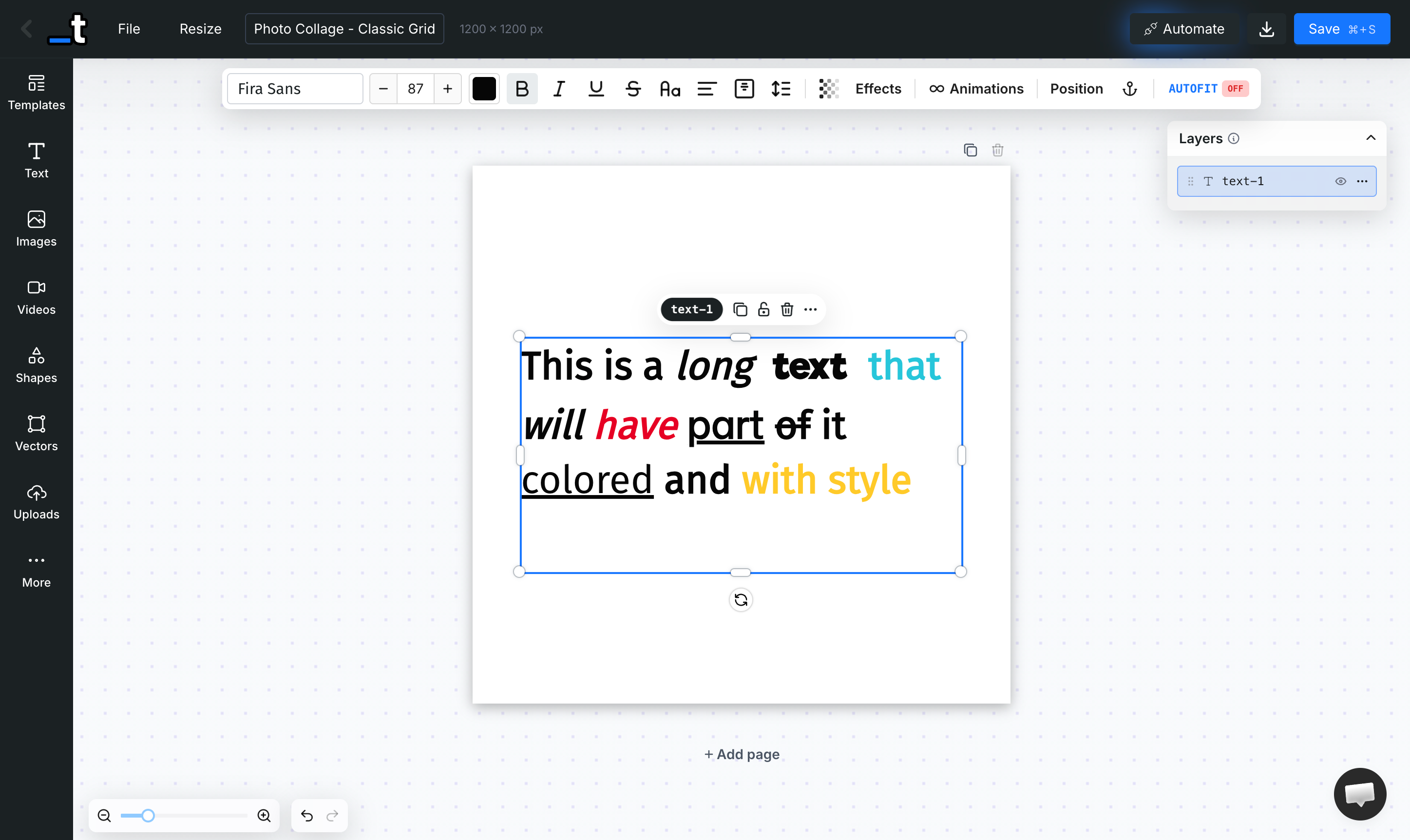
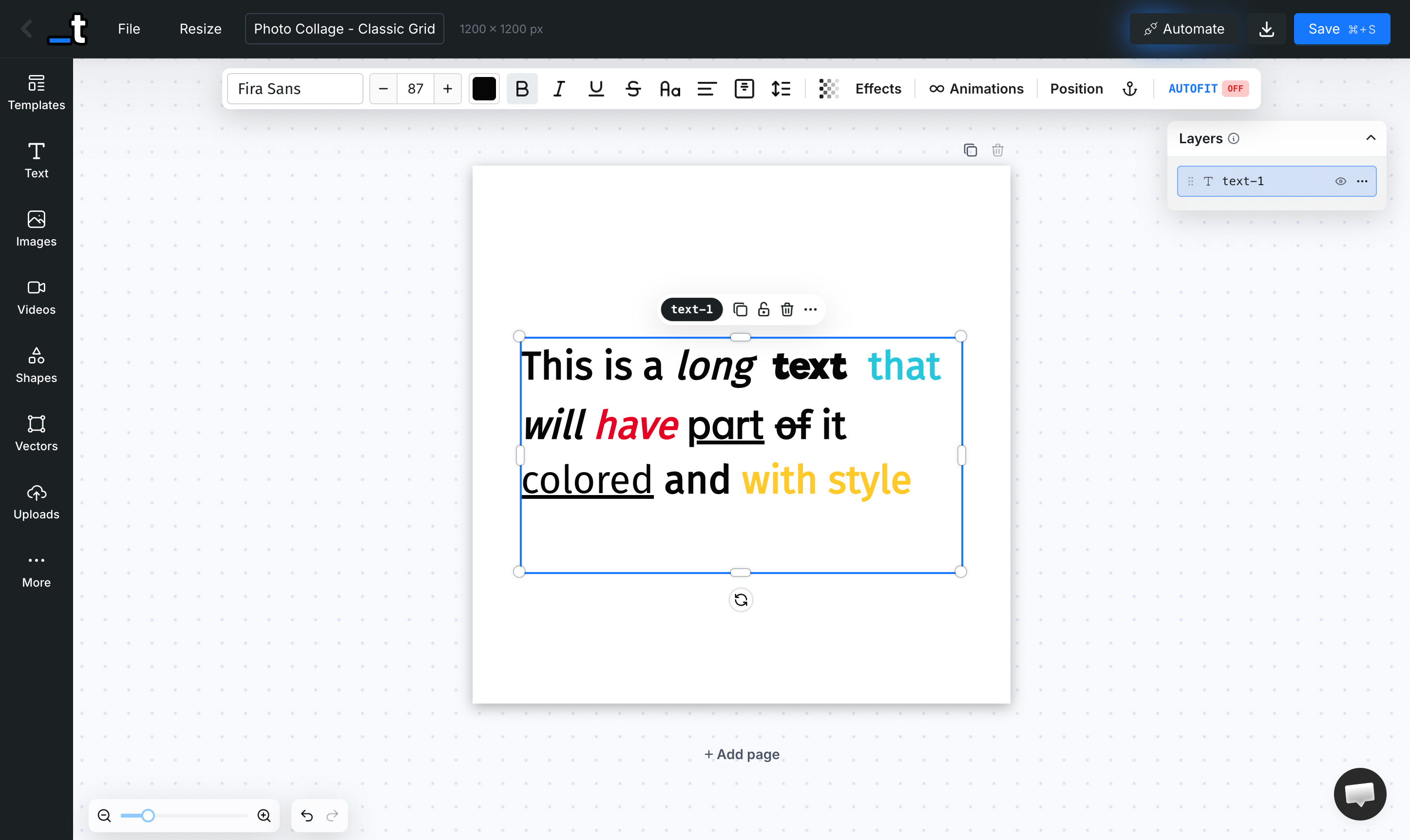
You can now finally style text to parts of your text layer!
Double-click to enter edit mode, select a portion of text, and apply bold, italic, underline, strikethrough, color or font family — just to that selection.
No more needing separate text layers for differently styled words within the same block.
Print Safe Zone
A new toggle in the File menu overlays a red-shaded border on each page, showing the print safe zone — the area where important content should be kept to avoid being cut during trimming. You can also adjust the safe zone width via a slider to match your print provider's specifications.
Animation Params in the API & MCP
Render API and MCP server now support a full animation parameter on each layer for video (MP4) renders. Control entrance, looping, and exit animations programmatically:
{
   "layers":{
      "title":{
         "text":"Hello World",
         "animation":{
            "in":{
               "type":"slide",
               "direction":"left",
               "duration":500
            },
            "loop":{
               "type":"pulse",
               "duration":1000
            },
            "out":{
               "type":"fade",
               "direction":"out",
               "duration":300
            },
            "start":0,
            "end":5000
         }
      }
   }
}
You can also use the Templated MCP or our AI Generator to create a video template with a prompt like this:
“An animated video template for TikTok/Reels in 1080x1920 portrait format. Include a bold animated title that slides in, a subtitle that fades in, and a pulsing call-to-action button. Use a dark gradient background with vibrant accent colors. Stagger the animations so elements appear one after another. 8 seconds duration.”
Font Detection for Faster Renders
The renderer now analyzes the content of the render to detect exactly which fonts are used and loads only those. This significantly reduces network overhead and speeds up render times, especially for templates using just a few fonts.
We are seeing around 25% faster render times!
From around 2.2 seconds now down to 1.8 seconds ⚡
Template Gallery API Endpoint
A new public endpoint — GET /v1/templates/gallery — lets you browse our gallery of professionally designed templates via the API. Filter by keyword, category, tags, dimensions, and paginate through results.
Optionally include layer definitions for deeper integration:
GET /v1/templates/gallery?query=instagram&category=social-media&limit=10&includeLayers=trueMore Improvements
Search by Template ID
You can now paste a template UUID directly into the Dashboard search bar to find a specific template instantly — in addition to searching by name or tag.
Auto-Folder on Template Creation
When you create a new template while browsing a folder, it's automatically placed in that folder. No more manual "Move to Folder" step after creation. Works for all creation methods — blank, AI generation, Canva import, PDF import, PSD import.
Remove Page Without Confirmation
Deleting a page now shows a "Don't ask again" checkbox in the confirmation popup. Check it once, and all future page deletions skip the confirmation. You can re-enable it anytime from the same popover.
New Languages: German, Dutch, Chinese & Czech
The editor UI is now available in German, Dutch, Chinese Simplified, and Czech, joining English, Spanish, Portuguese, French, and German — bringing us to 8 supported languages.
Embedded Editor: Hide Tabs
New hide-tabs parameter for the embedded editor. Pass a comma-separated list of tabs to hide:
?hide-tabs=videos,uploads,qr-code,barcodeAvailable tabs: text, images, videos, shapes, vectors, uploads, qr-code, barcode, rating
Embedded Editor: Template Selection
New allow-template-selection=true parameter for the embedded editor. When enabled, end users can browse and switch templates from within the embedded editor via a Templates Gallery tab.
😮💨 That was a lot!
Thanks all for all the suggestions and bug reports.
You definitely helps us build a better tool!
As always, feel free to add more suggestions in our feedback board.
Until the next one,
Pedro